题目内容
A laser (激光) is used to produce very powerful beams of light. These beams of light are so powerful that they make holes in steel very quickly. Today laser is getting wider and wider use in more and more fields.
Why is laser so much more powerful than other kinds of light? What makes laser beam so different from other beams?
Laser is a kind of light and also a form of energy. A laser beam is made up of very short waves. These waves all have the same wavelength. The laser beam keeps going on and off all the time, and is off much longer than it is on. As these changes are very fast, we can not see them. During the time the laser beam is off, the energy for the next burst of light is being built up, so when the beam is on again, it will be a strong burst. And the laser beam doesn’t spread, that is, it doesn’t get wider and wider as other light beams do. This is why the laser beam can keep all of its energy and is so much more powerful than other light beams.
1.The article is about ______.
[ ]
A.light B.a form of energy
C.laser D.light beam
2.Laser beam is ______ other light beams.
[ ]
A.different from B.the same as
C.almost the same as D.made up of
3.Laser ______ any other kind of light.
[ ]
A.is faster than B.is wider than
C.keeps longer than D.is more powerful than
4.Because the laser beam ______, it can keep all of its energy.
[ ]
A.isn’t like other light beams
B.can keep going on and off all the time
C.doesn’t spread
D.can change
5.Which of the following is TRUE?
[ ]
A.Laser is made up of waves of different lengths.
B.The time when the laser beam is on is much shorter than when it is off.
C.Laser is getting wider and wider at present.
D.Light can make holes in steel.

 阅读快车系列答案
 Congratulations on selecting our wireless mighty mouse. The mouse is of high quality. Only the scroll ball is visible at first glance, but it is actually a four – button mouse. At both sides, there are a couple of force – sensing buttons which can be programmed according to your need.
A camera and a computer can “see” something that perhaps millions of pairs of eyes failed to see for 480 years: the Mona Lisa’s necklace. The discovery about the famous painting was made by an American physicist.
The Mona Lisa, painted by the Italian, Leonardo da Vinci, has been on show for many years in Paris. Now a row of white spots on the neck have been “seen”. They are said to be the remains (痕迹) of a necklace which the artist later painted over.
The painting will be examined further by using infrared scanning (红外线扫描) techniques. Laser (激光) technology can be used to show what lies directly under the surface of the finished work, too. This will help us to understand how the artist drew the picture: Did he begin with a quick-made drawing or have second thoughts as he painted the picture?
This kind of knowledge will show us the famous artist at work. It may also help to explain Mona Lisa’s smile, which has puzzled art lovers for centuries.
【小题1】This passage is mainly about ______.
| A.the famous artist Leonardo da Vinci |
| B.an American physicist’s discovery |
| C.further researches on the Mona Lisa |
| D.The uses of modern technology |
| A.a famous artist | B.a famous painting |
| C.a smiling woman | D.a lost necklace |
| A.Mona Lisa once wore a necklace |
| B.someone stole the necklace from the Mona Lisa |
| C.the artist did not keep the necklace he had painted on the neck |
| D.the artist had a necklace stolen while working on the painting |
| A.are still invisible to visitors |
| B.have turned into a necklace |
| C.have already appeared before visitors |
| D.are looking more and more like a necklace |
| A.Mona Lisa and her smile |
| B.the time when it was finished |
| C.infrared scanning and laser |
| D.this art work and the artist |
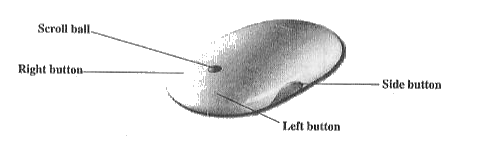 Congratulations on selecting our wireless mighty mouse. The mouse is of high quality. Only the scroll ball is visible at first glance, but it is actually a four – button mouse. At both sides, there are a couple of force – sensing buttons which can be programmed according to your need.
There are many famous museums throughout the world where people can enjoy art, Washington, D.C. has the National Gallery of Art(美术馆); Paris has the Louvre; London, the British Museum. Florida International University(FIU) in Miami also shows art for people to see. And it does so without a building, or even a wall for its drawings and paintings.
FIU has opened what it says is the first computer art museum in the United States. You don't have to visit the University to see the art. You just need a computer linked to a telephone.
You can call the telephone number of a University computer and connect your own computer to it. All of the art is stored in the school computer. It is computer art, produced electronically (采用电子手段) by artists on their own computers. In only a few minutes, your computer can receive and copy all the pictures and drawings.、
Robert Shostak is director of the new computer museum. He says he started the museum because computer artists had no place to show their works.
A computer artist could only record his pictures electronically and send the records, or floppy discs(软盘), to others to see on their computers. He could also put his pictures on paper. But to print good pictures on paper, the computer artist needed an expensive laser(激光) printer.
Robert Shostak says the electronic museum is mostly for art or computer students at schools and universities. Many of the pictures in the museum are made by students. Mr Shostak said the FIU museum will make computer art more fun for computer artists because more people can see it. He says artists enjoy their work much more if they have an audience. And the great number of home computers in America could mean a huge audience for the electronic museum.
【小题1】The main purpose of this text is to give information about ______.
A. famous museums throughout the world.
B. a computer art museum in Miami, U.S.A.
C. art exhibitions in Florida Intentional University
D. latest development in computer art
【小题2】To see the art in FIU museum, your special needs include ______.
| A.floppy discs |
| B.a computer and a printer |
| C.pictures and drawings on paper |
| D.a computer connected to the museum by telephone line |
| A.Paintings drawn by means of computer. |
| B.Different styles of paintings. |
| C.Drawings done by art students of FIU. |
| D.Old paintings. |
| A.Robert Shostak wanted to do something for computer scientists |
| B.Robert Shostak wanted to help computer artists |
| C.art students needed a place to show their works |
| D.computer scientists wanted to do something about art |
| A.art students |
| B.owners of computers |
| C.exhibits in the museum |
| D.those who can enjoy art |